Mesh jobs and remote execution
A mesh job runs on a machine you enrolled, under your account, at commits the job manifest pins. The account service records durable job decisions; your hardware executes. Compute and provider credentials stay on your machines, the service never runs the job and never sees provider keys.
This is provider-neutral infrastructure: codex/claude/cursor-style providers plug in behind the same job contract.
Job types
| Type | What it does |
|---|---|
start-session |
Spawn a provider session on a worker, the remote-run case. |
diagnostic |
Run diagnostics against a device or workspace and report back. |
prepare-workspace |
Materialize a workspace at a pinned revision so a later job or handoff starts warm. |
How a job runs
- Create. You create a job against the account, targeting a device or a set of requirements. The job carries a manifest pinning the workspace definition revision and the exact repository commits it needs.
- Advertise and claim. Enrolled devices running the mesh worker advertise capability. A worker that satisfies the job's placement constraints claims it. Placement is checked before assignment: capability (can this device run this job at all) and workspace readiness (does it have what the manifest needs, or can it get it).
- Verify Git state. Before spawning anything, the worker verifies the repository state matches the pinned commits. A drifted tree is a failed claim, not a job that runs on the wrong code.
- Execute in an isolated worktree. Each attempt runs in its own per-attempt worktree at the pinned commit. Attempts never share a working tree and never touch your checkout.
- Record and watch. Durable job state and required recovery records remain account-scoped. Supported upgraded clients can carry live commands and output over an authenticated, encrypted direct session with the host when a route is enabled and reachable. Artifacts the job produces upload sealed, see Artifacts and share links.
- Integrate. Results transfer back and integrate in dependency order; conflicts surface visibly rather than merging silently.
Attempts, leases, incarnations
A job's attempts are first-class. Each attempt carries a lease. The worker must keep renewing it or the attempt is presumed lost, and a worker incarnation that identifies which worker process holds it. If a worker dies mid-attempt, the lease expiry is what tells the account the attempt is gone; nothing is declared finished on a heartbeat failure.
Watching live
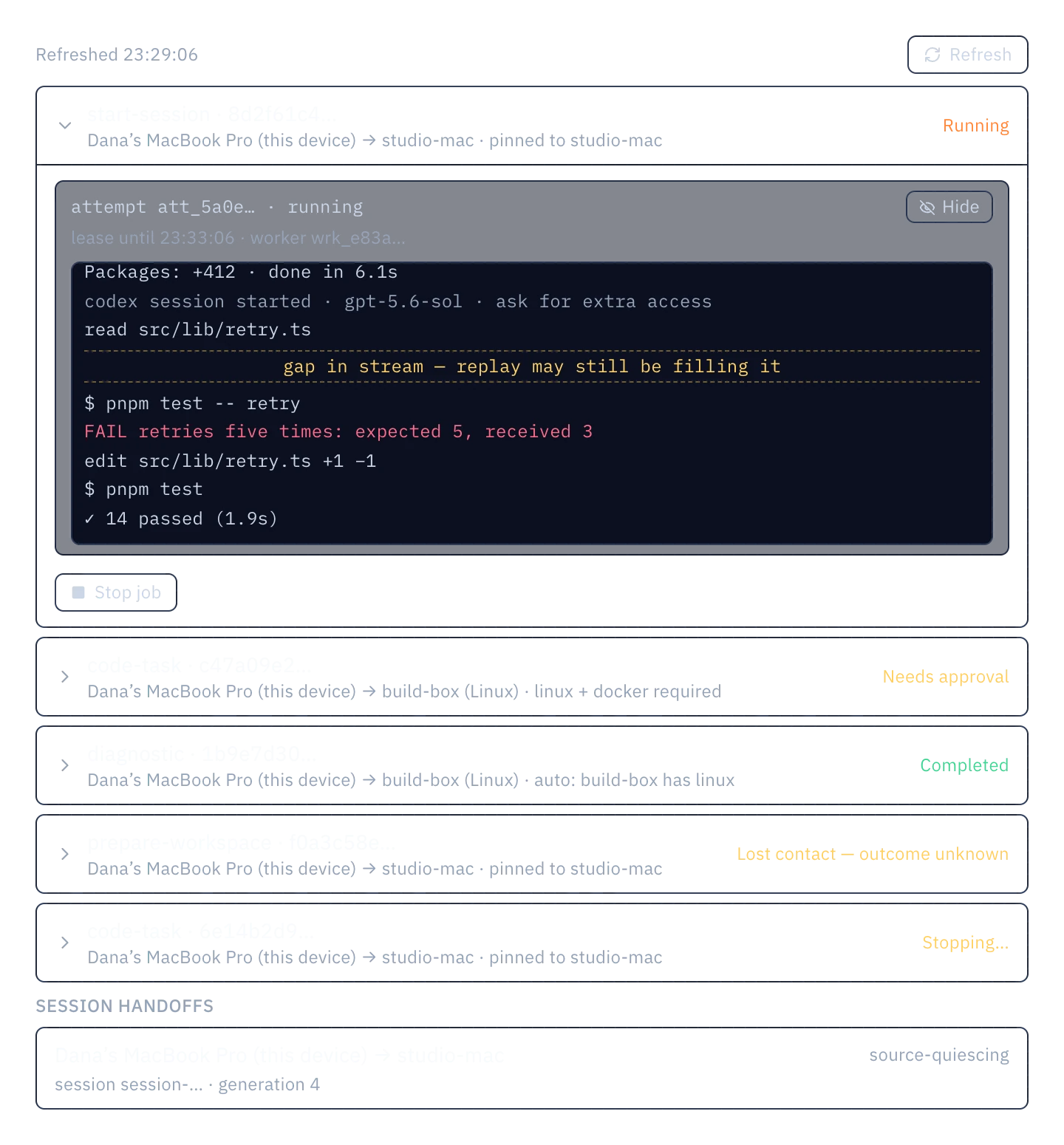
Watch on a live attempt shows durable activity and, when the client and host have a supported enabled route, live output from an encrypted host session. The account service remains responsible for durable job decisions and required recovery; it is not the live data path for those host sessions. Routes are selected automatically, LAN first: the host's LAN-address candidates, then other private routes, explicit HTTPS and managed ingress. A managed route needs a provisioned, enabled endpoint and uses the provider's proxy, not a peer-to-peer connection; availability depends on the deployment. A watch can move to a better route mid-stream once the replacement session has authenticated and caught up. See LAN-first Mesh routes.
The activity view combines saved history and live output:
- durable replay fills the history up to the point you joined;
- live frames append as they journal;
- gaps in the stream are marked, not hidden. If the replay can't cover a span, you see the seam.
Approvals
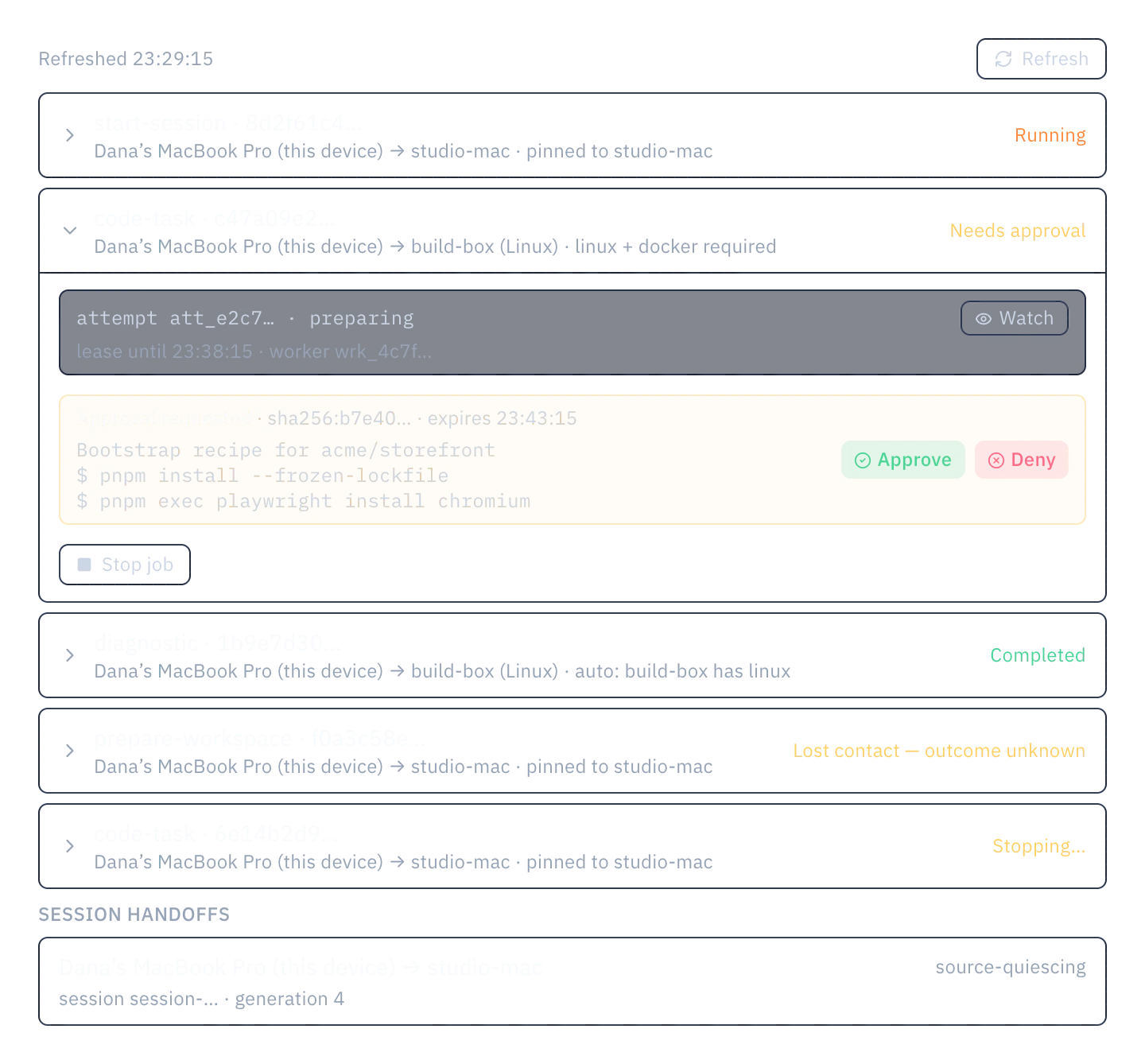
Pending approvals show the action digest, what the action will do, and an expiry. Approve/Deny renders only where this device is actually permitted to decide. An approval pinned to another device, or raised by this device's own worker, shows what it is waiting on instead of offering buttons that would no-op.
Job status
Job states are labeled by what is actually known:
Stopping…while cancellation propagates. The request is in flight; the outcome is not yet known.Lost contactwhen the outcome is genuinely unknown: the worker stopped answering and the backend cannot say whether the work finished. It is never presented as cancelled.
If a UI ever shows "cancelled" for a job whose outcome wasn't confirmed, that is a bug, not a state.
Running a worker on this device
The mesh worker is opt-in and device-local. The flag never syncs. Enabling it lets this machine claim account jobs it can satisfy; disabling it stops new claims. There is no account-level "run jobs everywhere" switch: every machine decides for itself, which is what keeps a laptop you forgot was enrolled from picking up work.
Live host access is separate from worker opt-in. An upgraded client still needs a reachable host endpoint. Managed endpoints need provisioning and must be enabled for the deployment; when no route is usable, the supported account path continues to provide durable coordination.
Job history
The Remote executions list shows source and target devices, the placement explanation, and state, capped at the most recent 100 jobs. Older history is not retained in the list; the attempt journals that mattered are already entities.
Current limits
- The dispatch/attempt/lease machinery is covered by worker and artifact suites and rehearsed on real deployments; a physical multi-device demo is still pending. Treat cross-machine UX as unproven until the recorded run lands.
- Job history lists the most recent 100 executions.
- Worker opt-in is per-device by design; expect to enable it on each machine you want claiming work.
- Placement requires the manifest's workspace readiness. A job targeting a workspace the worker can't materialize will not run there.
- Direct live host traffic requires a compatible upgraded client and an enabled, reachable host route. Managed endpoints need provisioning, and their availability depends on the deployment.
- Route choice never grants execution and never resends a command. LAN routes still need backend admission and continuing authorization; they are not offline Mesh.