User-definable software factories
Beta through 30 November 2026.
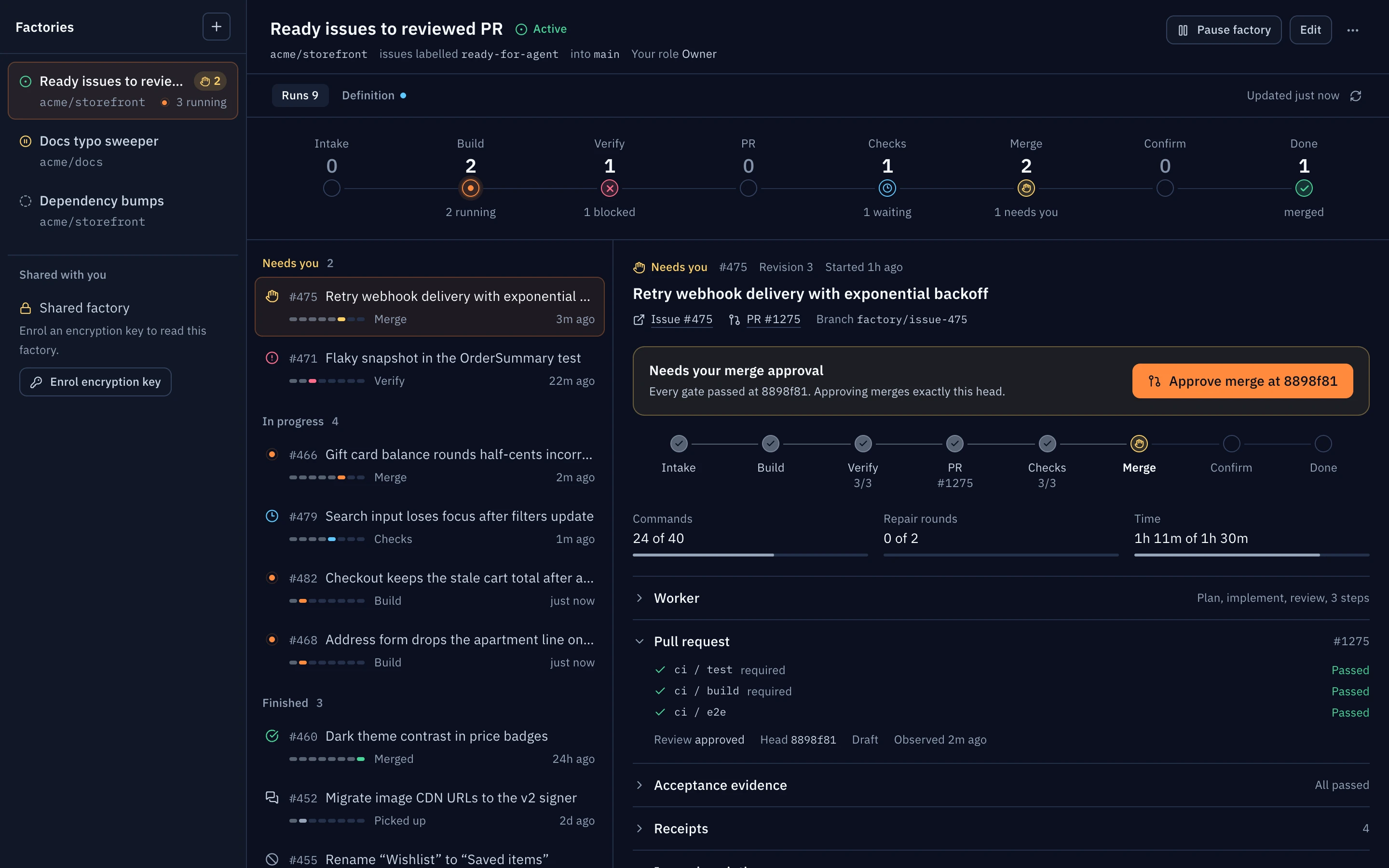
A user-definable software factory takes a GitHub issue to a verified, merged pull request under a policy you write and approve. You describe the process in chat. Mezair turns it into a typed, immutable definition with a pinned workflow graph. Nothing processes issues until you explicitly activate that exact saved revision.
Factories are a separate feature from Automations. An automation runs a prompt or workflow on a schedule or Watchtower event, in a throwaway worktree. A factory keeps one durable lifecycle per issue, from intake to confirmed merge and post-merge checks. The factory controller performs publication and merge as typed operations; agents never perform them directly.
Scope of this beta
| Area | Supported in this beta |
|---|---|
| Issue source | One GitHub repository per factory. Open issues with the configured label, created after activation. |
| Workers | Saved workflow graphs whose agent steps run through local Codex app-server execution. Activation rejects other providers and remote nodes. |
| Host | The trusted Mezair automation daemon on a macOS or Linux host that stays awake and online. |
| Merge | Human-approved merge, or a standing automatic merge you authorise at activation. |
| Audience | Private to you, or shared within an organisation on a backend that supports factories. |
An example
Type something like this into chat or the Factories prompt:
For new issues labelled
ready-for-agentinacme/web, work againstmainusing my "Implement and review" workflow. Each issue must passpnpm testandpnpm lint. Open a draft PR, repair CI and review feedback at most twice, then ask me to approve the merge. Runpnpm testagain after merge.
Mezair drafts a definition and shows a preview before anything is saved:
github.com/acme/web: new issues labelledready-for-agent; basemain- the pinned graph, its step count and the models it uses
- each acceptance criterion with the check command at the same position
- check counts, command budget, run minutes and repair rounds
- whether the factory may publish branches and pull requests
- the merge mode: an authorised person approves each current head, or standing automatic merge
- visibility, and a note that activation applies to future issues only
If you later ask for automatic merging once required checks and reviews pass, that is a new revision with a different merge grant, and you review and activate it again.
Set up a factory
- Prepare the host. Sign in to Codex, connect GitHub with access to the repository, add its local checkout to the workspace, and save a workflow graph whose agent steps use Codex locally.
- Draft it. Open Factories in the Automate section of the sidebar and describe the process under Describe the issue-to-PR process you want…, then choose Draft from chat. You can also ask for a factory in an ordinary chat. The agent's factory tools draft, preview and save drafts; they never activate a factory on their own.
- Review the form. Correct the repository, label, base branch, criteria, checks, limits, publication, merge policy and audience. Choose Preview definition to see the exact typed definition.
- Save the draft. Saving creates an immutable revision and pins the workflow graph. A saved draft does not process issues.
- Activate it. Choose Review & activate, read the Exact activation policy, then choose Confirm activation. Activation prepares the automation daemon. If the definition changed after you reviewed it, activation stops and asks you to review the latest revision.
Later edits create new revisions that apply to new issues once activated. Existing runs keep the graph and grants they started with. A pause, revoked access or reduced merge authority applies to active runs straight away.
What you configure
| Field | What it controls |
|---|---|
| Factory name | The label shown in Factories and in each run. |
| Local source repository | The workspace checkout used to prepare isolated run checkouts. |
| Issue label | Only new open issues that carry this label are picked up. |
| Base branch | The branch pull requests target and merges land on. |
| Workflow graph | A saved graph, pinned when the revision is saved. |
| Acceptance criteria | One criterion per line. Each needs evidence before publication. |
| Pre-PR checks | One command per line, paired by position with the criteria. Each criterion needs exactly one check. |
| Post-merge checks | At least one command, run after GitHub confirms the merge. |
| Repair rounds | How many CI and review repair passes a run may make. Default 2. |
| Run minutes | Wall-clock budget per issue. Default 90. |
| Command budget | Observed shell commands across workers, repairs and checks. Default 40. It must leave room for the acceptance and post-merge checks. |
| Concurrent issues | How many issues can be in progress at once. Default 2. |
| Allow branch and PR publication | Lets the controller push the factory branch and open or update its pull request. This never grants merge. |
| Open as draft PR | Publishes the pull request as a draft. |
| Merge mode | Human-approved merge or Auto-merge under policy. |
| Merge method | Squash, merge commit or rebase. |
| Required CI checks | Exact GitHub check names that must pass on the current head. |
| Require human review approval | A factory-authored review never satisfies a required human approval. |
| Factory access | Private to owner, or shared within an organisation with visibility and roles. |
Credentials stay in your existing provider settings. They are never stored in the definition or the workflow prompts.
Criteria such as "the UI feels right" still need a person to review them. A check only proves what its command checks.
Merge modes
Human-approved merge. When the gates pass, the run waits in Awaiting merge approval. An authorised owner chooses Approve merge at current head. For a private factory, that is you. For an organisation factory, the backend accepts the approval only from a factory owner. A new commit invalidates both the approval and the evidence.
Auto-merge under policy. This is standing authority, limited to the factory's repository, base branch, merge method and gates. It requires publication permission, and only a factory owner can grant it at activation. Eligible runs then need no further confirmation in Mezair. Immediately before requesting a merge, the controller rechecks the exact PR head, the acceptance evidence, the required checks and the reviews.
Both modes respect GitHub branch protection and required reviews. A queued or accepted merge request is not a merge: the run completes only after GitHub reports the pull request merged and the post-merge checks pass. Pausing or deactivating a factory, or switching off auto-merge, stops new merge requests for active runs as well as future ones. Issue text, review comments and operator retries cannot change the merge policy.
The issue lifecycle
Each issue gets one durable run. Duplicate deliveries and restarts resume the same run instead of opening a second branch or pull request.
- Received. The issue is deduplicated and checked against the label and repository again.
- Implementing. The pinned graph runs in an isolated checkout.
- Validating. The controller seals the candidate commit, scans it for secrets, and runs each check against that exact commit and tree.
- Publishing. With publication allowed, the controller pushes the branch and opens or updates the pull request.
- Waiting for checks and Repairing. CI failures and review feedback on the current head go back to the workers, up to the repair budget. Each repair is validated again.
- Awaiting merge approval, Merging and Verifying merge. Merge follows the selected mode, GitHub's merge confirmation is observed, then the post-merge checks run.
- Completed. The issue reached a confirmed merge and passed its post-merge checks. A run that only opened a pull request is not complete.
A run can also show Blocked, Paused, Cancellation pending, Cancelled or Picked up. Every external write records an intent and a result. When GitHub's response is uncertain, the run reconciles with GitHub before it retries anything.
Oversight and takeover
The factory view shows its state, revision and issue runs. Each run lists its stage, budget use, repair count, pre-publication and post-merge evidence, and receipts.
| Control | Effect |
|---|---|
| Pause factory / Resume factory | Stops or restarts intake and new effects. |
| Deactivate | Stops the factory processing issues. Owner only. |
| Pause / Resume | Stops or continues one issue run. |
| Retry after reconcile | Retries a blocked step once its last external outcome has been reconciled. |
| Approve merge at current head | Human-approved mode only. Owner only. |
| Pick up thread | Claims and stops the run, then opens a new private chat in the workspace you pick, with the issue, graph, branch and evidence. |
| Cancel run | Stops further work. |
Cancellation and takeover stay pending while a merge outcome is unknown. If a merge wins the race, it cannot be undone. The run shows it as merged and still runs the post-merge checks. Cancellation does not reverse commands or external effects that already happened.
Worker isolation
- Workers run with an isolated
HOMEandCODEX_HOMEthat keeps only the model sign-in. - Inherited MCP tools and provider-native subagents are disabled.
- The sandbox is limited to the originating sandbox level, and tool network access is off.
- Workers cannot call Mezair's validation, delivery, factory or merge tools.
- The controller seals the candidate with repository hooks and signing commands disabled. The reviewed checks supply the verification instead.
The Codex workspace sandbox does not fully isolate reads on the host. This is why the controller scans the whole candidate for secrets before every publication.
Organisation factories
Shared factories need a Sync & Mesh backend with factory registry and access support, plus its matching database migration. Older backends fail closed. Each recipient enrols their account encryption key (Enroll encryption key). One designated executor host claims and runs the work.
| Visibility | Who can see the factory and its runs |
|---|---|
| Organization-wide | All current members of the organisation. |
| Team/project (default) | Members of the selected GitHub team. |
| Restricted members | Members invited explicitly. |
| Role | Allowed actions |
|---|---|
| Viewer | Follow progress and read the run details and evidence their source permissions allow. |
| Operator | Viewer actions, plus pause and resume the factory, and pause, resume, cancel, retry and pick up runs within the approved policy. Operators cannot approve merges, deactivate the factory, or widen its scope. |
| Owner | Operator actions, plus edit, activate, deactivate, approve merges, manage visibility and roles, and grant publication and merge authority. |
The backend enforces these roles on every request, whatever controls a client shows.
Membership alone grants no repository access or execution identity. Mezair checks current membership, role and GitHub source permission on every list, read and control request, including direct links. Removing access cuts off future reads and control. Owners and admins can revise policy remotely, but the source repository of a factory never changes. If you pick up a remote run, you map any local repository by its GitHub identity.
Limits
- One GitHub source repository per factory. Other issue providers are not supported.
- Only local Codex workflow nodes. There is no standalone server deployment; the trusted desktop automation daemon must stay installed, awake and connected.
- Budgets cover wall-clock time, observed shell commands, concurrency and repair rounds. Workers are stopped promptly when a budget runs out. There is no hard pre-execution command allowlist and no spend or dollar ceiling.
- An ambiguous asynchronous merge request is not resolved automatically. The run waits for attention.
- Missing membership, source permission, key context, backend capability or an uncertain external result stops new writes; it never widens access.
- Encrypted hosted factory snapshots and run history stay in the hosted database after an account or organisation is removed. Current access checks still revoke access. Automatic purge and key rotation or recovery are not implemented.
- On a new repository, start with human-approved merge and read the first runs' receipts before you grant automatic merge.